Integrating the Medieval Knight Silhouette Vector Bundle into Professional Design Workflows
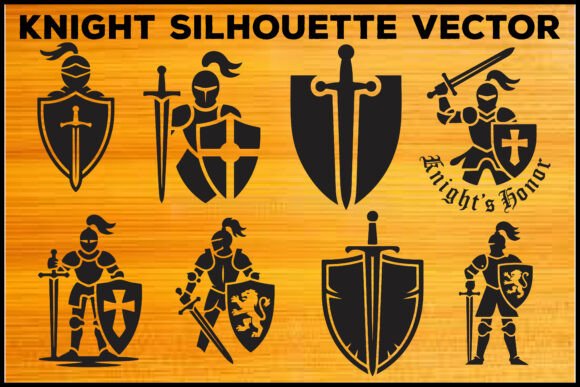
In the fast-paced environment of digital design and content creation, asset management is often the bottleneck that slows down project delivery. Whether you are a freelance graphic designer, a small business owner managing your own branding, or a hobbyist creating custom merchandise, the quality and flexibility of your source files determine the efficiency of your output. The Medieval Knight Silhouette Vector Bundle serves as a specialized resource designed to streamline this phase of the creative process. By providing a comprehensive set of editable vectors, scalable web formats, and high-resolution raster images, this bundle allows creators to bypass the time-consuming task of drafting complex silhouettes from scratch.
Understanding how to effectively integrate these assets into your existing workflow requires more than just downloading the files. It involves recognizing where these specific design elements fit within the broader lifecycle of a project—from initial concept and brand alignment to final production and quality control. This article explores the practical application of the bundle, focusing on compatibility, customization, and strategic implementation across various media.
Asset Preparation and File Compatibility
The foundation of any efficient design workflow is file compatibility. One of the primary advantages of the Medieval Knight Silhouette Vector Bundle is its multi-format structure. Before beginning any design task, it is crucial to select the correct file type based on your intended output medium. The bundle includes eight EPS files, eight SVG files, eight PNG files, and eight JPG files, each serving a distinct purpose in the production pipeline.
For professional designers using Adobe Illustrator or CorelDRAW, the EPS files are the starting point. These fully editable vectors allow for precise manipulation of anchor points, paths, and curves. This level of control is essential when adapting a generic silhouette to match specific brand guidelines or artistic directions. If you are working in a web-based environment or using cutting machines like Cricut or Silhouette, the SVG files are the optimal choice. Their scalability ensures that the image remains crisp at any size, which is critical for both large-format printing and small-scale digital icons.
For users who do not have access to vector editing software, the included PNG and JPG files provide immediate usability. The PNG files, rendered at 300 DPI with transparent backgrounds, are ready for direct insertion into documents, presentations, or composite images without the need for background removal. The JPG files offer a high-quality alternative for contexts where transparency is not required, such as social media posts or blog headers. By organizing these files into clearly labeled folders before starting your project, you reduce decision fatigue and maintain a clean, efficient workspace.
Customization and Brand Alignment
Once the appropriate file format is selected, the next phase involves customization. A pre-made silhouette is rarely used in its raw form in professional branding; it must be adapted to convey the specific tone and identity of the project. The knight silhouettes in this bundle feature swords, shields, and decorative emblems, providing a robust base for modification.
To maintain brand consistency, consider adjusting the weight and style of the silhouette. In vector software, you can simplify paths to create a more modern, minimalist look, or add intricate details to evoke a historical or fantasy aesthetic. The clean, bold lines of the original designs make them particularly versatile for logo development. For instance, a security firm might use the shield element to symbolize protection, while a gaming community might emphasize the sword and dynamic posture to convey action and strength.
Color integration is another critical step. While silhouettes are traditionally black, adapting them to your brand’s color palette can enhance recognition and emotional impact. Use the vector files to experiment with gradient fills, texture overlays, or negative space techniques. This stage of the workflow is where the Medieval Knight Silhouette Vector Bundle transitions from a generic asset to a bespoke design element. Ensure that any modifications adhere to accessibility standards, particularly if the final design will be used in digital interfaces where contrast ratios are vital for readability.
Implementation Across Media and Platforms
The versatility of the bundle allows for seamless implementation across a wide range of media. Understanding the technical requirements of each platform ensures that the final output maintains its quality and intent. Below are common use cases and the recommended approach for each:
- Print-on-Demand Merchandise: When creating t-shirt prints, posters, or mugs, use the EPS or SVG files to ensure sharp edges at large sizes. Verify the color mode is set to CMYK for accurate print reproduction, and check that the design fits within the printable area of the garment or product.
- Digital Branding and Web Design: For websites and apps, the SVG format is preferred due to its small file size and scalability. Embed the SVG code directly into HTML to allow for CSS styling and animation capabilities, enhancing user engagement without compromising load times.
- Social Media Content: Use the high-resolution PNG files for quick turnaround content. The transparent background allows for easy layering over photos or colored backgrounds, making it ideal for promotional graphics, event announcements, or profile pictures.
- Laser Cutting and CNC Projects: The SVG files are compatible with most laser cutting software. Ensure that all paths are closed and that the design is optimized for the material being cut, such as wood, acrylic, or leather. Simplify complex details if necessary to prevent cutting errors.
Each of these applications requires a different approach to file preparation. By matching the file type to the medium, you avoid common pitfalls such as pixelation, color shifts, or incompatible file errors. This proactive planning saves time during the revision and approval stages, allowing for smoother collaboration with clients or team members.
Quality Control and Long-Term Asset Management
Effective workflow management extends beyond the immediate project. Integrating the Medieval Knight Silhouette Vector Bundle into your long-term asset library requires disciplined organization. Store the original files in a centralized cloud storage system or local server with clear naming conventions. Include metadata tags such as "medieval," "knight," "vector," and "silhouette" to facilitate quick retrieval for future projects.
Regularly review the usage of these assets to identify opportunities for repurposing. A silhouette created for a logo might later serve as a watermark, a section divider in a document, or an icon in a mobile app. By viewing these assets as modular components rather than one-off solutions, you maximize their value and return on investment. Additionally, keep track of any customizations made to the original files. Save versions with descriptive names, such as "Knight_Logo_Blue_V1.eps," to maintain a clear history of design iterations.
Quality control should also involve checking the integrity of the files after transfer between devices or software platforms. Open the EPS files in different vector editors to ensure compatibility, and test the SVGs in various web browsers to confirm consistent rendering. This attention to detail prevents unexpected issues during final production and ensures a professional standard across all deliverables.
Strategic Value in Creative Processes
Incorporating pre-designed elements like the Medieval Knight Silhouette Vector Bundle is not merely a shortcut; it is a strategic decision that frees up cognitive resources for higher-level creative tasks. By eliminating the need to draw complex shapes from scratch, designers can focus on composition, typography, and overall visual hierarchy. This shift in focus often leads to more polished and effective final products.
Furthermore, using standardized, high-quality assets promotes consistency across multiple projects and campaigns. For businesses, this consistency reinforces brand identity and builds trust with the audience. For individual creators, it establishes a recognizable style that can differentiate their work in a crowded market. The bundle’s inclusion of multiple formats ensures that this consistency can be maintained regardless of the output channel, from physical merchandise to digital platforms.
Ultimately, the success of any design project depends on the seamless integration of tools, assets, and processes. The Medieval Knight Silhouette Vector Bundle provides a reliable foundation for this integration, offering the flexibility and quality needed to meet diverse creative demands. By understanding its features and applying best practices in file management and customization, creators can enhance their productivity and elevate the quality of their work.