Unlock Precision and Style with the Modern Circle Pattern Vector Bundle
There is a distinct satisfaction in watching a laser cutter or CNC machine bring a digital design to life, but that moment of triumph can quickly turn into frustration if your source files aren't up to the task. Whether you are running a small business selling custom home décor or simply enjoying a weekend hobby with your Cricut or Glowforge, the quality of your vector files dictates the quality of your final product. This is where the Modern Circle Pattern Vector Bundle steps in as a reliable resource for creators who value precision. However, diving into the world of digital cut files without understanding what makes a bundle truly "ready-to-use" often leads to wasted material, machine time, and unnecessary stress.
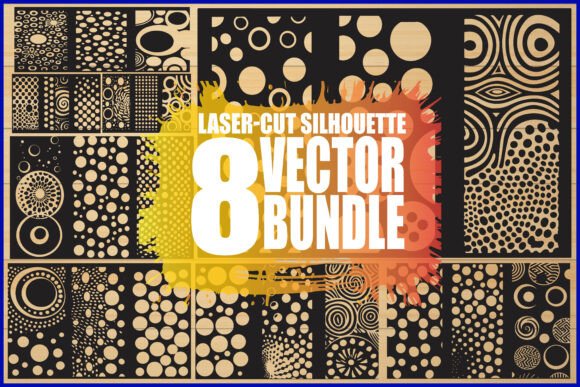
Many enthusiasts make the mistake of assuming all SVG or DXF files are created equal. They download a pack, load it into their software, and hit "cut," only to find gaps in their stencils, overlapping lines that confuse the laser, or resolutions that pixelate when scaled up for a large room divider. The Modern Circle Pattern Vector Bundle, featuring eight unique geometric and abstract circle patterns, is designed specifically to avoid these pitfalls, but only if you know how to leverage its full potential. Let's explore the common misunderstandings surrounding vector bundles and how to ensure you get clean, professional results every time.
The Trap of Low-Resolution and Non-Scalable Files
One of the most frequent errors beginners make is confusing raster images with true vectors. You might find a beautiful circle pattern online, but if it is just a high-resolution JPG, scaling it up for a large wall panel will result in jagged edges and blurry lines. Lasers and CNC machines follow paths; they do not print pixels. If your file lacks defined mathematical paths, the machine cannot interpret where to cut.
This bundle solves that issue by providing genuine vector formats including SVG, EPS, AI, and PDF. These formats allow you to scale your design from a small coaster to a six-foot room divider without losing an ounce of clarity. A common misconception is that you need expensive software like Adobe Illustrator to use these files. While AI and EPS are industry standards, the included SVG and PNG files work seamlessly with free or entry-level software used by Cricut and Silhouette users. Before you commit to any design, always check the file extension. If a seller only offers JPG or PNG for a cutting project, walk away. For this bundle, you receive eight of each major format, ensuring compatibility regardless of your workflow.
Overlooking File Compatibility and Machine Settings
Another area where crafters often stumble is assuming one file type works best for every machine. While SVG is the universal language of the web and many cutting machines, some industrial CNC routers or older laser software prefer DXF or PDF for better path recognition. Using the wrong format can sometimes cause the software to group elements incorrectly, leading to cuts in the wrong order or missed details.
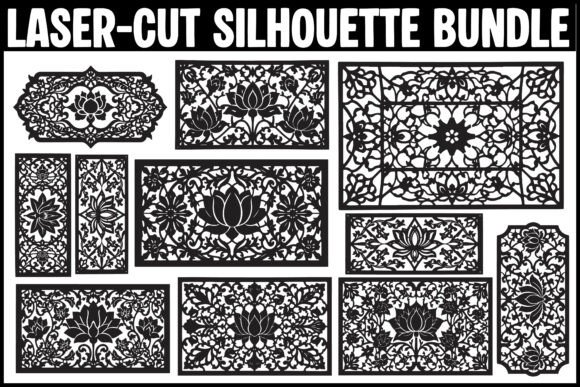
The versatility of this Laser-Cut Silhouette Vector Bundle lies in its comprehensive file inclusion. You aren't forced to convert files yourself, which can introduce errors. Instead, you can choose the native format your machine prefers. For instance, Glowforge users often find SVGs integrate smoothly with their cloud interface, while those using specialized CAD software for CNC milling might prefer the DXF or PDF options for precise dimension control. By having access to eight different file types per design, you eliminate the guesswork and reduce the risk of machine misreads that ruin expensive sheets of wood or acrylic.
Neglecting the Importance of Transparent Backgrounds
When working on layered projects, such as multi-colored wall art or intricate invitations, a non-transparent background can be a nightmare to remove manually. Many free resources provide images with white boxes behind them, requiring tedious tracing or background removal steps that often leave artifacts. These artifacts can confuse optical sensors on cutting machines or create unwanted borders in your final print.
This bundle includes PNG files with transparent backgrounds, ready for immediate use in digital mockups or printing processes that require layering. This saves you significant prep time. Imagine creating a set of wedding invitations where you need to overlay a geometric circle pattern onto a textured paper scan. With a pre-masked transparent PNG, you simply drag and drop. Without it, you spend twenty minutes erasing pixels. It is a small detail, but in a production environment, these minutes add up to hours of saved labor.
Misjudging the Complexity of Geometric Designs
Geometric and abstract circle patterns look simple, but they can be deceptively complex when it comes to cutting. Thin bridges in a stencil can break during the weeding process, and overly dense patterns can cause heat buildup in laser cutting, leading to scorch marks or warping. A common mistake is choosing a design based solely on aesthetics without considering the material constraints.
The designs in this collection are optimized for structural integrity. The modern geometric lines are balanced to ensure that negative space doesn't compromise the strength of the material, whether you are cutting 3mm plywood or delicate cardstock. However, it is still vital to test your settings. Even with perfect vectors, running a laser too fast on a dense circle pattern can leave uncut spots. Always run a small test piece on a scrap of your intended material. Adjust your power and speed settings to account for the density of the geometric lines. The high-quality nature of these vectors ensures that if a cut fails, it is due to machine settings, not flawed artwork.
Failing to Plan for End-Use Applications
Finally, many creators buy assets without a clear plan for application, leading to "file hoarding" where bundles sit unused. To get the most out of the Modern Circle Pattern Vector Bundle, think about the specific needs of your projects before you start cutting. Are you making a room divider that needs to be sturdy? Focus on the designs with thicker connecting lines. Are you creating a delicate stencil for painting? Look for the patterns with more open negative space.
These eight pieces are not just random shapes; they are tools for interior decoration, scrapbooking, and functional art. Use them to create custom lighting fixtures where the circles cast interesting shadows, or as overlays for glass etching. The key is to match the design complexity to your skill level and tool capability. If you are new to laser cutting, start with the simpler patterns to master your feed rates and focus. As you gain confidence, move to the more intricate abstract designs for high-end client work.
In conclusion, the difference between a amateur-looking project and a professional finish often comes down to the quality of your digital assets. By avoiding the traps of low-resolution files, incompatible formats, and poor planning, you can elevate your crafting game. The Modern Circle Pattern Vector Bundle offers the diversity and technical reliability needed to support both hobbyists and entrepreneurs. Check your file formats, respect your machine's limitations, and let these versatile patterns transform your raw materials into stunning, precise works of art.